Stream Widgets
Live Score , Broadcast Bar , Schedule
Works with all apps and platforms




.svg)



Upgrade your World Cup stream with a complete widget pack made for live soccer match coverage, watch parties, sports streams, and tournament-themed broadcasts.
The World Cup Stream Widget Pack includes 3 hosted widgets designed to work through Browser Source URLs in OBS Studio, Streamlabs Desktop, and StreamElements. No coding, file importing, or manual installation is required.
Customize your widgets, copy your Browser Source URL, paste it into your streaming software, and place it directly into your scene.
World Cup Broadcast Bar: A compact match bar for World Cup streams with teams, countdown, kickoff time, live score state, and final result display.
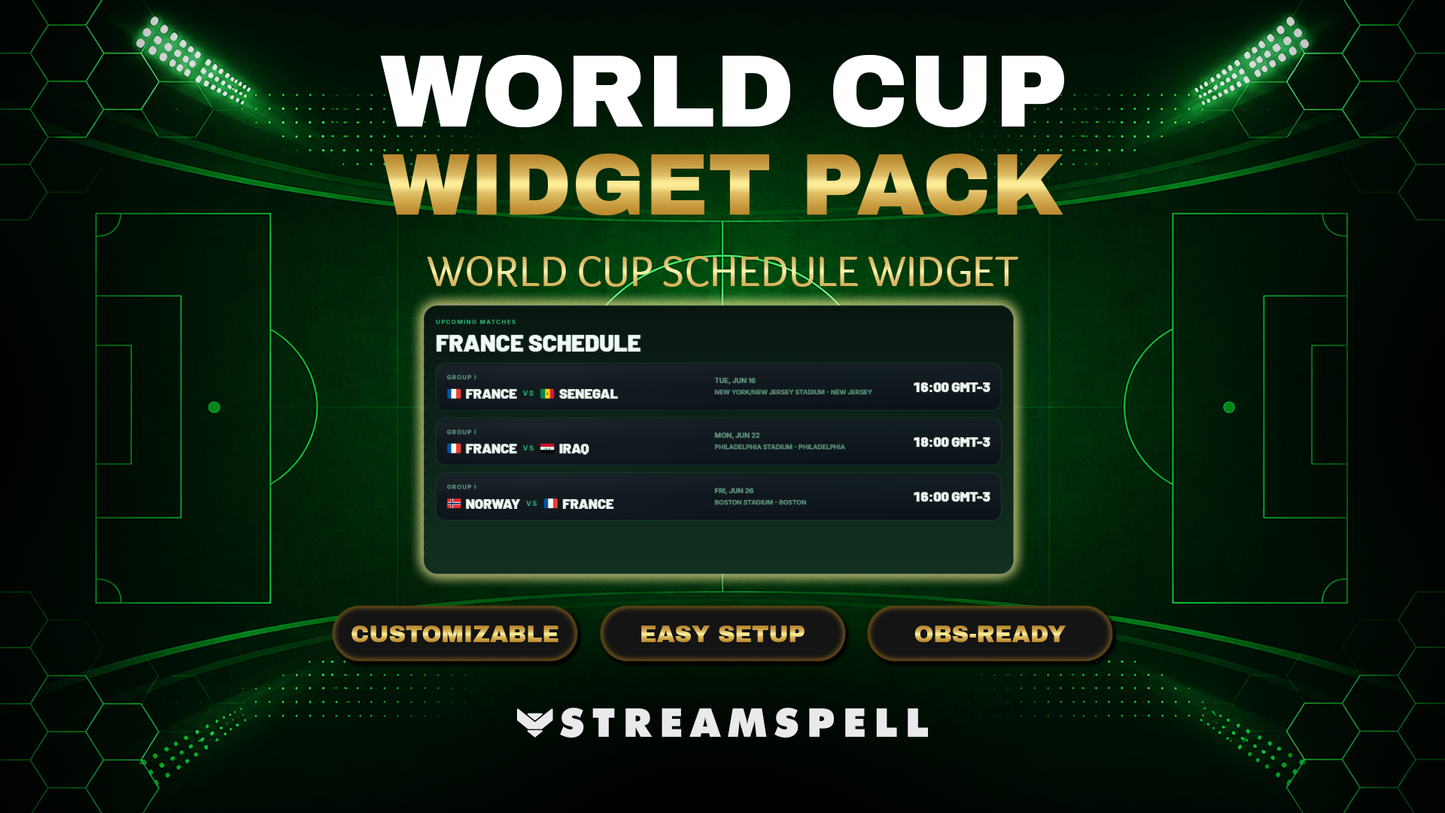
World Cup Schedule Widget: A schedule card for upcoming World Cup matches, with team or group filtering, match date and time, and optional stadium and city info.
World Cup Live Score Widget: A live score card for World Cup streams with current score, match status, final result display, and fallback to the next match when needed.
The World Cup Broadcast Bar is a compact match overlay designed for streamers who want a clean, sports-broadcast look during World Cup streams.
It can display team names, flags, match date, kickoff time, countdown, live score state, and final score state after the match ends.
Perfect for:
Lower thirds
Starting Soon scenes
Pre-match coverage
Live match overlays
Watch party streams
Sports broadcast layouts
Customization options include colors, glow, shadows, patterns, and visual styling, so you can match the widget to your stream brand or World Cup scene design.
The World Cup Schedule Widget helps you show upcoming matches directly on your stream.
Display multiple matches, filter by team or group, show match dates and times, and optionally include stadium and city information.
Perfect for:
Schedule screens
Pre-show scenes
Halftime screens
Break screens
Tournament overview layouts
Upcoming match displays
You can customize the title, colors, style, and overall presentation to fit your stream setup.
The World Cup Live Score Widget is designed to show current match information during your stream.
It can display the score, match status, final result, or fallback to the next match when needed.
Perfect for:
Live match scenes
World Cup watch parties
Halftime score screens
Final score displays
Tournament stream overlays
Sports-themed broadcasts
The widget also includes language options and visual customization settings for colors, effects, and styling.
The widgets support 5 language options:
English
Portuguese
Spanish
German
French
Access your widget setup page
Customize the widget style and settings
Copy your Browser Source URL
Paste the URL into OBS Studio, Streamlabs Desktop, or StreamElements
Resize and position the widget in your scene
OBS Studio
Streamlabs Desktop
StreamElements
Any streaming software that supports Browser Source URLs
Open your scene
Go to Sources
Click +
Choose Browser
Paste your widget Browser Source URL
Set the width and height
Position the widget in your scene
Open your scene
Click Add Source
Choose Browser Source
Paste your widget URL
Set the width and height
Position the widget in your layout
Open your StreamElements overlay or scene workflow
Add a Browser Source or web layer
Paste your widget URL
Adjust the size
Position the widget in your layout
3 World Cup stream widgets included
Broadcast Bar, Schedule, and Live Score widgets
Hosted Browser Source setup
Works with OBS Studio, Streamlabs Desktop, and StreamElements
No coding required
No file import required
Language options: English, Portuguese, Spanish, German, and French
Automatic timezone detection
Manual timezone option
Live score presentation
Match countdown support
Final score state
Team and flag display
Customizable colors and effects
Customizable glow, shadows, patterns, and styling
Sports broadcast-inspired design
Made for World Cup streams, watch parties, sports streams, and tournament coverage
Internet connection
Streaming software with Browser Source support
Access to the hosted widget setup page
OBS Studio, Streamlabs Desktop, StreamElements, or compatible software
This product is delivered as a hosted Browser Source widget pack.
It is not a downloadable native StreamElements custom widget package. You do not receive files to upload or edit manually. Setup is done through hosted widget links.
This product is an independently created streaming tool and is not affiliated with, endorsed by, sponsored by, or officially connected with FIFA or any World Cup organizer.
This is a digital product
No physical item will be shipped
The widgets are intended for streaming use
Browser Source setup is required
You can customize the visual style before adding the widgets to your scene
Yes. StreamSpell widgets are made for streaming setups that support browser sources or widget URLs, including Streamlabs, OBS Studio, StreamElements, and similar apps.
Most StreamSpell widgets include a quick install link for Streamlabs. You can also copy the widget URL from Streamlabs and add it manually as a browser source or widget URL in apps that support custom widgets.
Customization depends on the widget. Some widgets include editable settings or custom fields, while others are designed as finished ready-to-use layouts. Check the product details for the exact options included.
Yes. The widget can be used with streams on Twitch, YouTube, Kick, Facebook, and other platforms as long as your streaming app supports the widget setup.
The download includes the widget setup files, links, or instructions listed in the product details. Exact contents may vary by widget.
No. This is a digital download. After purchase, you receive access to the files or setup instructions online.